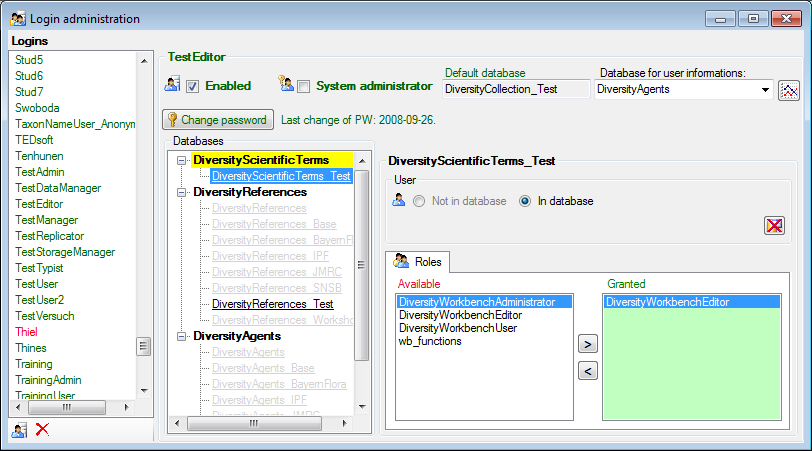
To administrate the logins on the database server, their permissions and roles respectively as well as access to projects choose Administration - Logins ... from the menu. A window will open as shown below.
To see the activity of a login
click on the
 button. A window will open
as shown below
listing all databases and tables together with the timespan
(From - To) and the
number of data sets where any activity of the current login has
been found.
button. A window will open
as shown below
listing all databases and tables together with the timespan
(From - To) and the
number of data sets where any activity of the current login has
been found.

To create a new login click on the
 button. A window will open as shown
below.
button. A window will open as shown
below.
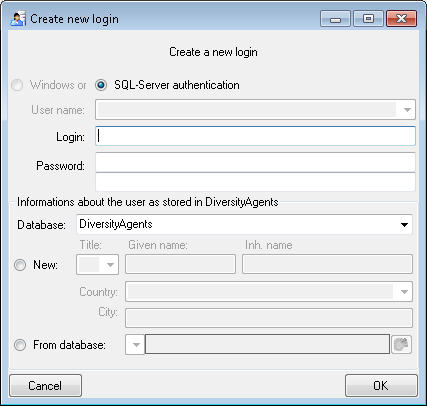
Here you can enter the name of the
new login, the
password and the information about the user which will be stored
in a
DiversityAgents database. You may either create a new entry in
this database or select
an existing one: Click on the  button to
search for a name in
the database (see below).
button to
search for a name in
the database (see below).

To edit the access for a login on
the server
select the login in the list. If a login should be disabled
 , uncheck the enabled checkbox
(see below).
, uncheck the enabled checkbox
(see below).

All databases on the server will be listed with the current database showing a yellow background. The databases where the login has no access will be listed in gray while the databases accessible for a login are black.

To allow the access to a database select the database from the list and choose database as shown below.

Use the > and < buttons to add or remove roles for the login in the database (see below).

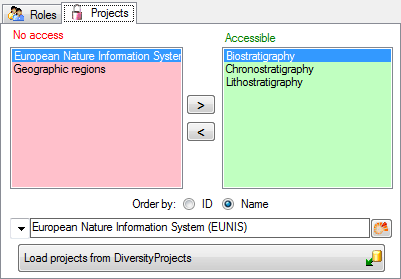
The access to terminologies can be administrated as projects where the projects correspond to the terminologies (see below). Use the > and < buttons to add or remove a terminoloy for the login.