
The program will automatically try
to connect to all the modules within the Diversity Workbench. To edit these
connections choose Connection ->
 Module connections ... from
the menu. A form (see below) will open where you can edit the connections.
Module connections ... from
the menu. A form (see below) will open where you can edit the connections.
 Module of the DWB
 Database
 Server
 Type of
identification
Type of
identification Link
Link Linked Server
 Webservice
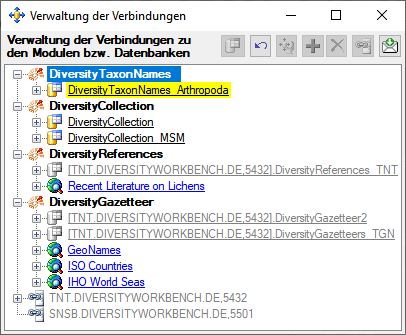
To
requery the connections use the  button. If you want to add
a connection to
a different server click on the
button. If you want to add
a connection to
a different server click on the  button and connect to the database you
want to add to the list. Added databases will be displayed in
green. To remove a
connection from the list select it and click on the
button and connect to the database you
want to add to the list. Added databases will be displayed in
green. To remove a
connection from the list select it and click on the
 button. If an added connection misses a
password, this will be indicated by a
red backcolor.
Click on the button to enter the missing password.
button. If an added connection misses a
password, this will be indicated by a
red backcolor.
Click on the button to enter the missing password.


To forward changes to data linked to
datasets in the current database you first need to choose the databases
that should be scanned for linked data. These databases will be
indicated by a
green backcolor.
To include a database in the update, select it and click on the
button. To include all databases of e.g. DiversityCollection in the
update, select the module entry in the tree and click on the
button. To remove a selected database from the inclusion, select it and
click on the
button.
Webservices like Index Fungorum will be displayed in blue.