
For any wishes or problems with the database
that you want to send to the administrator you can do this under the menu Help
-
 Feedback. Move to the window you want to be included
in your feedback and click ALT - PRINT to create a screenshot. Then open the feedback
form under the menue Help -
Feedback ... . A form as shown below will open. To enter
the screenshot, click on the
Feedback. Move to the window you want to be included
in your feedback and click ALT - PRINT to create a screenshot. Then open the feedback
form under the menue Help -
Feedback ... . A form as shown below will open. To enter
the screenshot, click on the
 button. The description is entered in the field Description. In
the field Topic enter the topic of your feedback (will appear in response
e-mail). The Priority can either be empty or set to 3 levels:
urgent,
as soon as
possible and nice to have. If necessary, enter a date
in the field ToDo until when you would like to have the task described in
you feedback be solved.
button. The description is entered in the field Description. In
the field Topic enter the topic of your feedback (will appear in response
e-mail). The Priority can either be empty or set to 3 levels:
urgent,
as soon as
possible and nice to have. If necessary, enter a date
in the field ToDo until when you would like to have the task described in
you feedback be solved.
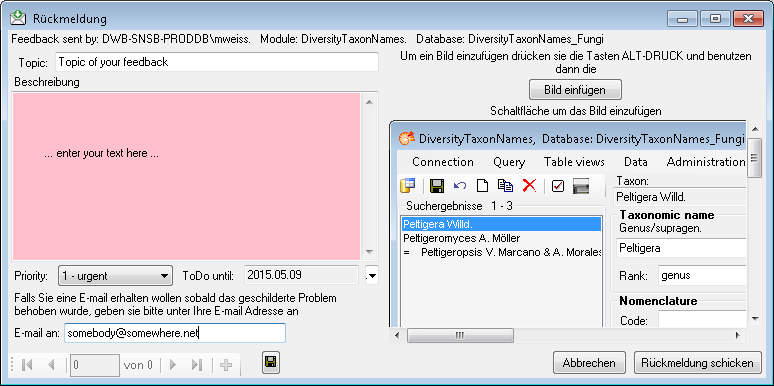
To send the feedback click on the
 button.
If any error messages show up while working with the application, you can find further details concerning the part of the application where the error occurred and the parameters involved in the file DiversityTaxonNamesError.log located in your resources directory.
To open the errorlog, choose
Help -
 ErrorLog from the menu. A window will open showing the content
of the errolog. By default the errorlog will at program start.
You can keep the errorlog if needed by chossing
Help -
Errorlog - Keep error log
from the menu. A button will appear that allows you to clear the
error log manually: Help -
ErrorLog from the menu. A window will open showing the content
of the errolog. By default the errorlog will at program start.
You can keep the errorlog if needed by chossing
Help -
Errorlog - Keep error log
from the menu. A button will appear that allows you to clear the
error log manually: Help -
 Clear ErrorLog.