
To import taxonomic names, choose Data →
 Import taxonomic names ... from the menu. A window as shown below will open.
Choose the encoding of your datasource, that means if your datasource was encoded
with ASCII or a unicode format. To ensure a correct import of special signs please
provide resp. convert your data in one of the available formats. You must choose
a Project, in which your data should be imported. You may choose
a Taxon list and a Datasource and if the names
should be imported as accepted.
Import taxonomic names ... from the menu. A window as shown below will open.
Choose the encoding of your datasource, that means if your datasource was encoded
with ASCII or a unicode format. To ensure a correct import of special signs please
provide resp. convert your data in one of the available formats. You must choose
a Project, in which your data should be imported. You may choose
a Taxon list and a Datasource and if the names
should be imported as accepted.
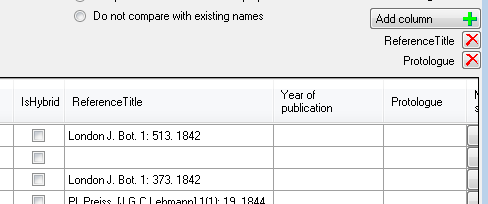
If there are additional
columns in the source file (separated by tab) you may add these unsing the
Add column
 button (see below) in the sequence as found
in the source file. The additional columns will be included in the analysis of
the data as shown below. To remove a column use the
button (see below) in the sequence as found
in the source file. The additional columns will be included in the analysis of
the data as shown below. To remove a column use the
 button.
To start the analysis of the data,
just click on the
 button to open the source file. If you want to re-analyse a file with new
settings, click on the
button to open the source file. If you want to re-analyse a file with new
settings, click on the
 button. To send a feedback,
use the
button. To send a feedback,
use the
 button. If the names should be
linked to higher taxa, check the Link taxa to genera if present option.
The names can be compared with existing names within the current project or the
whole database. If you compare the names with the whole database, you can insert
a link for the current project for identical names that are missing in the
project.
button. If the names should be
linked to higher taxa, check the Link taxa to genera if present option.
The names can be compared with existing names within the current project or the
whole database. If you compare the names with the whole database, you can insert
a link for the current project for identical names that are missing in the
project.
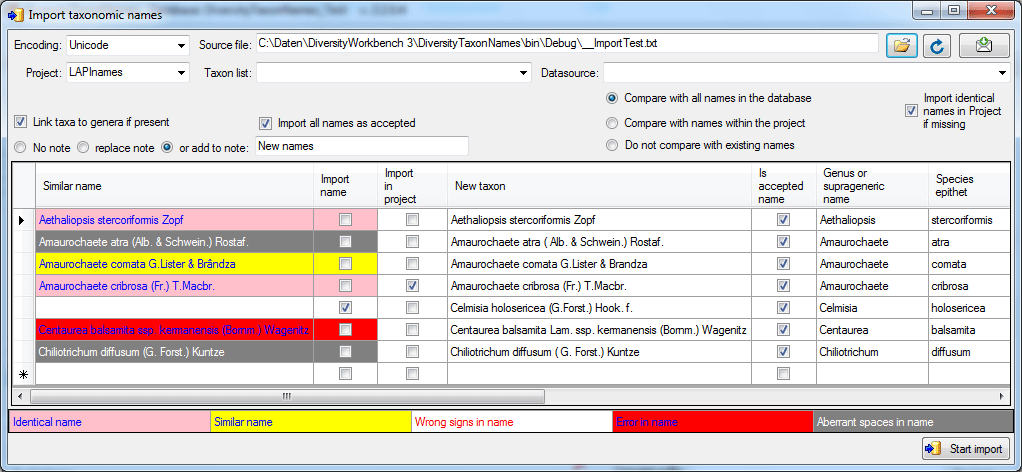
Your names will be listed as shown in the image above. If an error (e.g. special signs converted with the wrong encoding)

or a similar name

or an identical name

is found these will be marked as shown above and the names of your list will not be imported unless you check the according field (second column - Import name). If you changed one of the options, click on the Requery button to see the result.
To start the import, click on the according button
Start import.