
The maximal number of items shown in a query result can be set in the window for
the query options. The default value is set to 100. If you have a fast
connection to your database or need to see more or less results, you
may change this value to any number you like.
To change the displayed search fields click on the  button. This opens a form where you can select and deselect the
fields shown for searching specimens. You might also change the
maximum number of items that will be shown in the result list.
button. This opens a form where you can select and deselect the
fields shown for searching specimens. You might also change the
maximum number of items that will be shown in the result list.
The limit for the creation of drop down lists is by default set to 1000. If you connect to a database, the programm will create drop down list based on the entries in the database to ease the entry in the query. For slow connections you may set this to lower value to speed up the start of the program. If you set the value to 0 no drop down lists will be created.
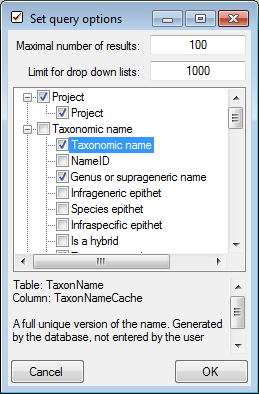
In the top of the form you can specify the maximal number of resultset that will be retrieved in one query. In the lower part you can select the search fields.