Subsections of Maintenance
Maintenance
Duplicates
If for any reason there are duplicates of taxa in DiversityTaxonNames
these can be listed in the  Duplicates part. Click
no the
Duplicates part. Click
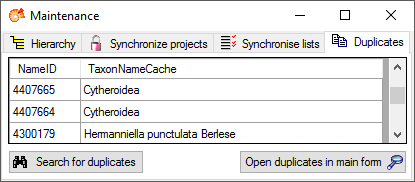
no the  Search for duplicates button to list all
duplicates independent of the project as shown in the image below. To
edit the detected duplicates, click on the Open duplicates in main
form
Search for duplicates button to list all
duplicates independent of the project as shown in the image below. To
edit the detected duplicates, click on the Open duplicates in main
form  button.
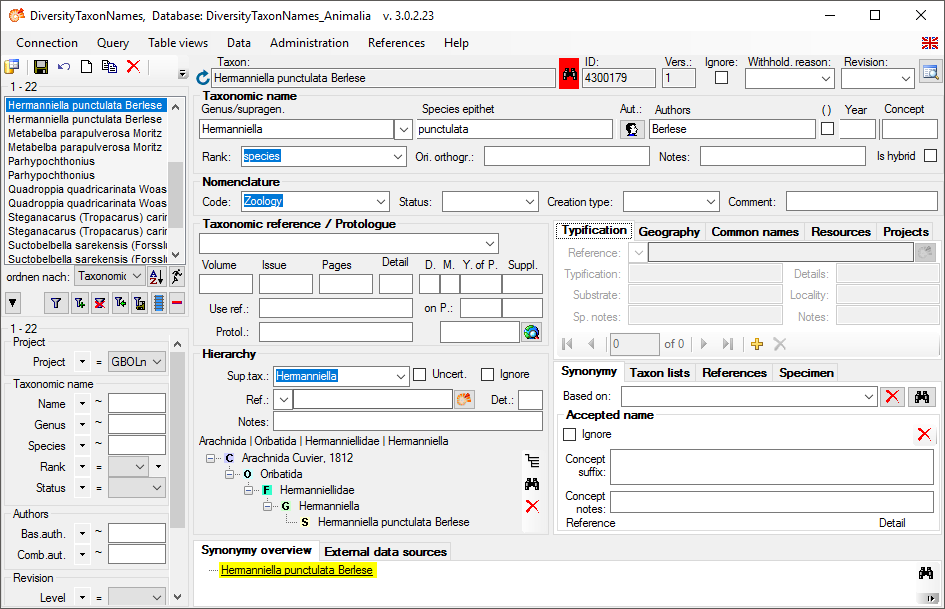
In the main form any duplicate will be marked by the appearence of a
button as shown below. Click on the button to change between the duplicates of a
name.
Maintenance
Hierarchy
In DiversityTaxonNames the hierarchy of a taxon is represented by the
relation to a parent taxon, e.g. Rosa canina - Rosa. To enable the
search within the whole hierarchy is cached as a text string e.g. ( …
Rosales | Rosaceae | Rosa | … ). After changes in the hierarchy
this string should be updated. Choose Administration -
 Database -
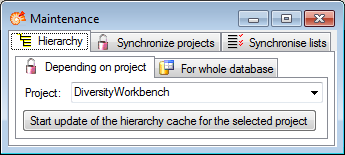
  Maintenance … from the menu. A window as
shown below will open. You can either update the hierarchy cache for a
single project or the whole database. For the first option, choose the
project that should be updated and click the start button to perform the
update. For the whole database just click on the
Maintenance … from the menu. A window as
shown below will open. You can either update the hierarchy cache for a
single project or the whole database. For the first option, choose the
project that should be updated and click the start button to perform the
update. For the whole database just click on the  button.
Maintenance
Lists
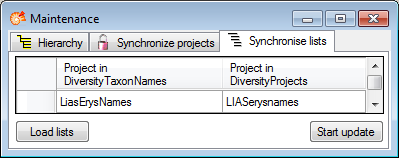
In DiversityTaxonNames names of lists  are cached according to the original data in DiversityProjects. If the original names are changed, you can
use the maintenance to synchronise the local names with the original
data (see image below). Click on the Load lists button to find all entries with names different from the originals. To update the names in the local cache, click on the Start update button.
are cached according to the original data in DiversityProjects. If the original names are changed, you can
use the maintenance to synchronise the local names with the original
data (see image below). Click on the Load lists button to find all entries with names different from the originals. To update the names in the local cache, click on the Start update button.
Maintenance
Projects
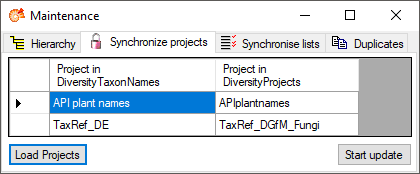
In DiversityTaxonNames names of projects  are cached according to the original data in DiversityProjects. If the original names are changed, you can
use the maintenance to synchronise the local names with the original
data (see image below). Click on the Load projects button to find all entries with names different from the originals. To update the names in the local cache, click on the Start
update button.
are cached according to the original data in DiversityProjects. If the original names are changed, you can
use the maintenance to synchronise the local names with the original
data (see image below). Click on the Load projects button to find all entries with names different from the originals. To update the names in the local cache, click on the Start
update button.
Maintenance
Synonyms
In DiversityTaxonNames synonyms by accident may refer to themselves. In
the  Symonyms section you can remove these
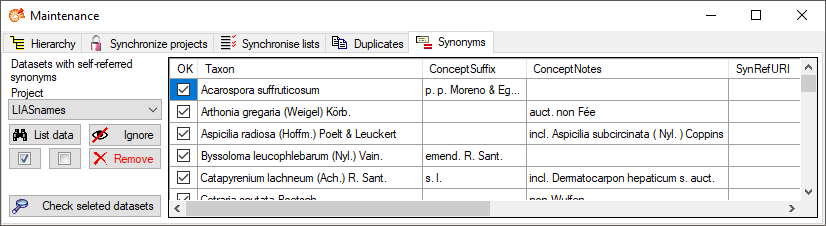
entries. Choose project and click on the List data botton. If self-referring synonyms
are detected the names containing these will be listed as shown below.
With the
Symonyms section you can remove these
entries. Choose project and click on the List data botton. If self-referring synonyms
are detected the names containing these will be listed as shown below.
With the  resp.
resp.
 button you can
check resp. uncheck all items in the list. If you want to inspect the
detected data in the main form, check those that should be shown and
click on the Check selected datasets button. If you want
to keep the data but ignore them, click on the
button you can
check resp. uncheck all items in the list. If you want to inspect the
detected data in the main form, check those that should be shown and
click on the Check selected datasets button. If you want
to keep the data but ignore them, click on the
 Ignore button. To remove the entries from the
synonymy table, click on the
Ignore button. To remove the entries from the
synonymy table, click on the  Remove botton (see image below) (tutorial:
  ).
).