
The taxonomy for the choosen name is depicted in the area Hierarchy. If
the taxonomy has not been specified a button (set hierarchy) will be visible 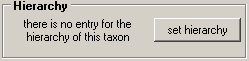
click on it to insert a dataset for the hierarchy of this taxon.
To choose a higher taxon you first have to specify the taxonomic rank of the choosen name

and type at least 2 characters of the higher taxon in the 'Superior taxon:' field.

Click on the drop down button  to get the list of taxa above the rank of the name for which you want to set
the hierarchy. The hierarchy will then be shown in the tree view (see
below). The taxa below the current taxon will be displayed in gray.
to get the list of taxa above the rank of the name for which you want to set
the hierarchy. The hierarchy will then be shown in the tree view (see
below). The taxa below the current taxon will be displayed in gray.
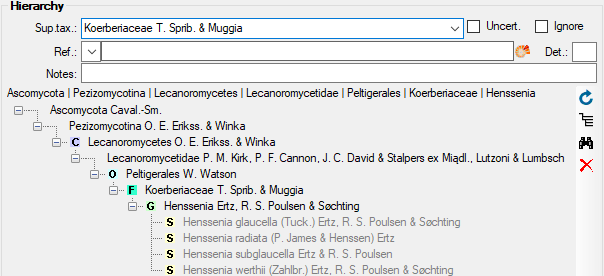
The first line shows the taxon or taxonomic group
superior to the choosen taxon. To directly access the database entry of a higher
taxon, choose this taxon in the hierarchy tree and click on  . The button
  will
delete this entry. As an alternative to delete the entry for the hierarchy,
you may set it on Ignore to keep the information but exclude it from the
creation of a hierarchical tree
(see chapter Ignored data for further details). To get an overview of the whole
hierarchy click on the button
will
delete this entry. As an alternative to delete the entry for the hierarchy,
you may set it on Ignore to keep the information but exclude it from the
creation of a hierarchical tree
(see chapter Ignored data for further details). To get an overview of the whole
hierarchy click on the button  . You
get an overview for the whole taxonomy including the current taxon as shown
below. The line above the hierarchy tree shows the cached value for the
hierarchy. After changes in the hierarchy this cached value may differ from the
actual hierarchy. To refresh it, click on the
. You
get an overview for the whole taxonomy including the current taxon as shown
below. The line above the hierarchy tree shows the cached value for the
hierarchy. After changes in the hierarchy this cached value may differ from the
actual hierarchy. To refresh it, click on the
 button.
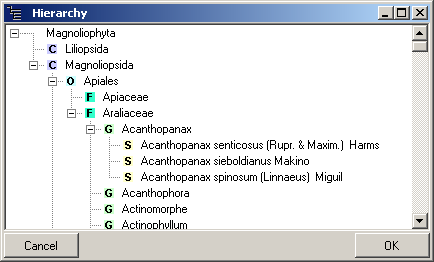
In the taxon tree the main taxonomic groups are indicated with icons (S = species, G = Genus, F = Family, O = Order, C = Class, K = Kingdom). To change the position of a taxon within the hierarchy, use the drag & drop function of the tree.
To enable a search within the hierarchy, please use the maintenace function to update the hierachy cache. The hierarchy is stored in one string, so to search for e.g. all members of e.g. a certain familiy e.g. Rosaceae, please use the ~ operator and a leading wildcard in your search string e.g. "% Rosaceae" or "* Rosaceae".
The information about the hierarchy is related to opinions of the editors and are allways restricted to a certain project. The data of the hierarchy are stored in table TaxonHierarchy.