Diversity Collection
Query Operators
When entering your query conditions, you have various operators to choose from.
The available operators are shown in the tables below.
Availability: t = text, n = numeric, d = date, h = hierarchy, x = XML, e
= EXIF, g = geography, a = annotation, m = module\
| Op. |
Meaning |
Example |
Avail. |
| ∼ |
search for an entry like… (you may use wildcards) |
Pinus s[iy]lvestris % |
tn---e-- |
| = |
search for an entry exactly equal to … |
Pinus silvestris L. |
tndh---- |
| ≠ |
search for an entry not like... |
Pinus s[iy]lvestris % (you may use wildcards) |
tn------ |
| ∅ |
search for an entry where a value is missing … |
|
tndhxeg- |
| • |
search for an entry where a value is present … |
|
tndhxeg- |
| - |
search for an entry between … and … |
2000 - 2003 |
tnd----- |
| | |
search within a list of entries, separated by "|" or one line per value. If wildcards ("%", "_") are included the query will search for values like the given values |
2000 | 2003 ... | 2000 2003 |
tn------ |
| ∈ |
search with exclusion of a list of entries with one value per line. Wildcards will be ignored |
2000 2003 |
tn—–m |
| ∉ |
search with exclusion of a list of entries with one value per line. Wildcards will be ignored |
2000 2003 |
tn—–m |
| ± |
search for an entry where only parts of the date are present… |
-.-.2006 |
--d----- |
| Δ |
search including children in a hierarchy … |
M-Fungi |
---h---- |
| / |
Search for entries containing a given XML node (not for EXIF) |
settings |
----x--- |
| ¬ |
Search for entries not containing a given XML node (not for EXIF) |
settings |
----x--- |
| ‡ |
Search for entries with a maximal distance of … |
POINT(24.24 45.243) | 50 km |
------g- |
| O |
Search for entries within an area |
POLYGON(34.5 ... |
------g- |
| ¤ |
Search for entries outside an area |
POLYGON(34.5 ... |
------g- |
| +H |
Search for entry including lower hierarchy |
Picea | Picea abies |
-------m |
| +S |
Search for entry including synonyms |
Picea abies | Pinus abies |
-------m |
| +HS |
Search for entry including lower hierarchy and symonyms |
Picea | Picea abies | Pinus abies |
-------m |
Operators for datasets
| Operator |
Meaning |
| ∅ |
search for missing datasets ... |
| • |
search for existing datasets ... |
Operators for text
| Operator |
Meaning |
Example |
| ∼ |
search for an entry like ... |
Pinus s[iy]lvestris % (you may use wildcards) |
| = |
search for an entry exactly equal to ... |
Pinus silvestris L. |
| ≠ |
search for an entry not like ... |
Pinus s[iy]lvestris% (you may use wildcards) |
| ∅ |
search for an entry where a value is missing ... |
|
| • |
search for an entry where a value is present ... |
|
| - |
search for an entry between ... and ... |
2000 - 2003 |
| | |
search within a list of entries, separated by "|" or one line per value. If wildcards ("%", "_") are included the query will search for values like the given values |
2000 | 2003 ... | 2000 2003 |
| ∈ |
search with exclusion of a list of entries with one value per line. Wildcards will be ignored |
2000 2003 |
| ∉ |
search with exclusion of a list of entries with one value per line. Wildcards will be ignored |
2000 2003 |
Operators for numeric data
| Operator |
Meaning |
Example |
| = |
search for an entry exactly equal to … |
Pinus silvestris L. |
| < |
search for an entry lower than ... |
2006 |
| > |
search for an entry higher than ... |
2006 |
| - |
search for an entry between ... and ... |
2000 - 2003 |
| | |
search within a list of entries, separated by "|" or one line per value |
2000 | 2003 |
| ∈ |
search within a list of entries with one value per line |
2000 2003 |
| ∉ |
search with exclusion of a list of entries with one value per line |
2000 2003 |
| ∅ |
search for an entry where a value is missing ... |
|
| • |
search for an entry where a value is present |
|
Operators for date values
| Operator |
Meaning |
Example |
| = |
search for an entry exactly equal to ... |
20.3.2006 |
| < |
search for an entry lower than ... |
20.3.2006 |
| > |
search for an entry higher than ... |
20.3.2006 |
| - |
search for an entry between two dates... |
20.3.2006 - 29.3.2006 |
| ± |
search for an entry where only parts of the date are present... |
-.-.2006 |
| ∅ |
search for an entry where the date is missing … |
|
| • |
search for an entry where the date is present and complete … |
|
Oparators for hierachy
| Operator |
Meaning |
Example |
| = |
search for an entry exactly equal to ... |
M-Fungi |
| ≠ |
search for an entry which is not equal to … |
M-Fungi |
| ∅ |
search for missing entry ... |
|
| • |
search for present entry ... |
|
| Δ |
search including children in a hierarchy ... |
M-Fungi |
Operators for XML
| Operator |
Meaning |
Example |
| ~ |
Search for entries like a given text (for EXIF) |
RDF |
| / |
Search for entries containing a given XML node (not for EXIF) |
settings |
| ¬ |
Search for entries not containing agiven XML node (not for EXIF) |
settings |
| ∅ |
search for missing entry ... |
|
| • |
search for present entry ... |
|
Operators for geography
Use (via local files or manual creation) resp. (via DiversityGazetteer) button to set geography
| Operator |
Meaning |
Example |
| ‡ |
Search for entries with a maximal distance of ... |
POINT(24.24 45.243) | 50 km |
| O |
Search for entries within an area |
POLYGON(34.5 ... |
| ¤ |
Search for entries outside an area |
POLYGON(34.5 ... |
| ∅ |
search for missing entry... |
|
| • |
search for present entry ... |
|
For yes/no fields exists a checkbox with 3 options:
 = yes,
  = no,
= no,
 = undefined
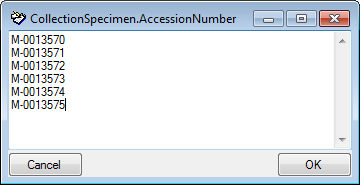
For a search within a lists (using the |, ∈ or ∉ operator) you may
double click in the text field to open a window where you can enter your
values. To separate the values either use the "|" sign or a new line
as shown in the image below.
Wildcards in SQL
There are 4 different possibilities for wildcards in SQL:
| Operator |
Description |
Example |
Result |
| % |
any string consisting of no, one or many characters |
Pinus % |
will find anything like Pinus, Pinus sylvestris, Pinus strobus etc. |
| * |
same effect as % (see above) |
|
|
| _ |
a single character |
Pinus s_lvestris |
will find Pinus sylvestris and Pinus silvestris etc. |
| […] |
any character out of a given range like [abcde] or [a-e] |
Pinus s[iy]lvestris |
will find Pinus sylvestris and Pinus silvestris |
| [^…] |
any character not in a given range like [^abcde] or [^a-e] |
Pinus s[^i]lvestris |
will find Pinus sylvestris but not Pinus silvestris |